1
Download the Happ app
Happ is a free client for iPhone, Android, Windows and macOS. Pick your platform:
Getting connected takes a couple of minutes. You'll need the free Happ app and the link from your cabinet.
Happ is a free client for iPhone, Android, Windows and macOS. Pick your platform:
Your subscription link lives in the cabinet, under “My subscriptions” — tap “Copy”. It's personal: don't share it, or other people will be able to use your access.
Go to “My subscriptions”Open Happ, tap “+” in the top right corner and choose “Add from link”. The app fills in the link from your clipboard by itself.
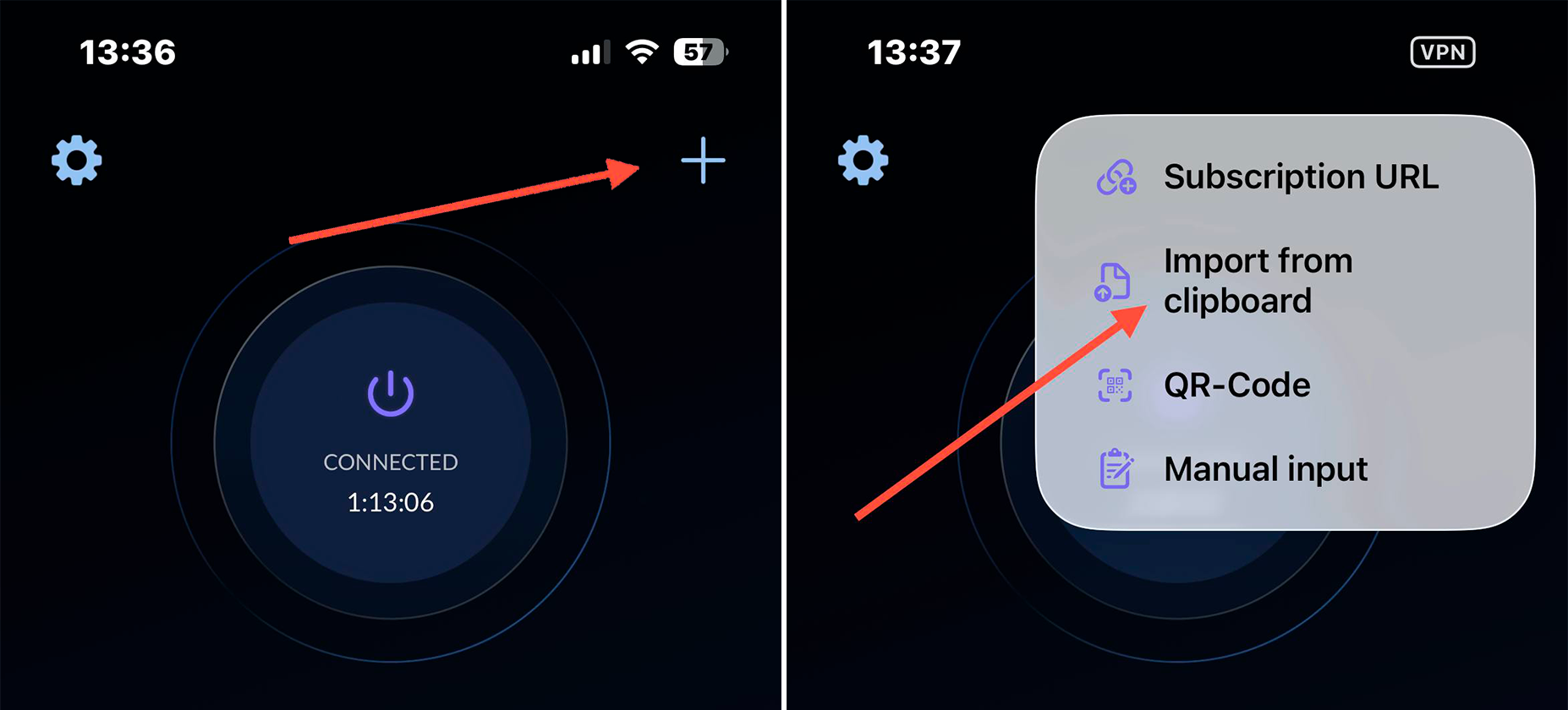
Tap the profile that was added — the connection starts automatically. After that, just use the internet as usual.
Copy the link again under “My subscriptions” and make sure you got all of it — it's long and starts with happ://.
Check that the right country is selected in your cabinet settings — it controls which sites go through the VPN and which go direct. After changing it, reopen the profile in Happ.
You can add the same link on your phone, computer and router — one subscription covers all your devices.
Stuck? Message us — we'll help. @northporthubvpnbot · support@northport-hub.com